How to Choose the Right Gaming Controller in Bangladesh
Choosing a gaming controller becomes easier when you first consider your gaming device, the types of games you play, and your preferred connection. A controller that works properly on a Windows PC may not offer the same support on PlayStation, Xbox, Android, iPhone, or Smart TV. Some games may also require keyboard, mouse, or touch controls instead of a controller.
Comfort, button layout, analog-stick accuracy, trigger response, input delay, battery life, and remapping support can all affect gameplay. A basic gamepad may be enough for casual gaming, while racing, fighting, sports, and simulation games may require different controls and features. This guide explains how to choose a gaming controller based on compatibility, game type, features, and budget, helping you avoid paying for functions you may never use.
What Is a Gaming Controller?
A gaming controller is an input device used to control movement, actions, menus, and other functions in a video game. The term covers several devices, including gamepads, joysticks, arcade sticks, and racing wheels. However, when most people look for a controller for a PC, console, mobile phone, or tablet, they usually mean a gamepad.
Gaming Controller, Gamepad, Joystick, Arcade Stick and Racing Wheel
A steering wheel setup that may include pedals and a gear shifter
Racing and driving simulation games
For most PC, PlayStation, Xbox, mobile, and tablet games, a gamepad is the practical choice. A joystick, arcade stick, or racing wheel is worth considering when you regularly play a specific type of game that benefits from specialised controls.
Check Device Compatibility Before Buying a Gaming Controller
Compatibility should be the first thing you check when choosing a gaming controller. A USB connector or Bluetooth connection does not mean the controller will work with every PC, console, mobile phone, or game. Always check the supported device, operating system, connection method, and game support before buying.
Confirm the television’s operating system, Bluetooth or USB support, and controller compatibility with the gaming app or service
Compatibility with PC Games
For Windows gaming, a controller with XInput support is usually easier to set up because most modern PC games recognise the Xbox-style button layout automatically. DirectInput controllers can still work, particularly with older games, but they may require manual button mapping or additional software.
Some PC games do not support controllers at all. Strategy games, certain competitive shooters, and older PC titles may work better with a keyboard and mouse. Check the game’s controller support before choosing a model for a specific title.
Compatibility with Consoles
Console compatibility is usually more restricted than PC compatibility. A controller made for PlayStation may not work on Xbox, and an Xbox controller may not work on PlayStation. Compatibility can also differ between console generations.
For example, a controller that works with PS4 games may not support PS5 games. Generic controllers may also lack console-specific functions such as adaptive triggers, touch controls, headset support, motion sensing, or a dedicated system button.
Console controllers generally fall into three groups:
First-party controllers: Made by the console manufacturer, such as Sony, Microsoft, or Nintendo.
Licensed third-party controllers: Made by another brand but officially approved for a particular console.
Generic third-party controllers: Usually more affordable, but compatibility and feature support can vary.
Compatibility with Mobile Phones, Tablets, and TVs
A controller may connect successfully to a phone, tablet, or television but still fail to work inside a particular game or app. The device and the game must both support controller input.
For a wired connection on Android, the phone or tablet may also require USB OTG support and a suitable adapter. On iPhone and iPad, check the supported iOS or iPadOS version and whether the controller is recognised by the game.
Smart TV and Android TV are not the same platform. Confirm the television’s operating system and supported controller types instead of relying only on the Bluetooth specification.
Choose the Right Connection Type
Gaming controllers generally use a USB cable, Bluetooth, or a 2.4GHz wireless receiver. Each option has practical advantages, so the right choice depends on your device, gaming setup, and preferred way to play.
Connection Type
Main Advantage
What to Consider
Suitable For
Wired USB
Stable connection without charging
Cable length may limit movement
Desktop gaming, competitive games, and fixed setups
Bluetooth
Connects without a separate receiver
Input response and compatibility can vary by device
Mobile phones, tablets, laptops, and casual gaming
2.4GHz Wireless
Fast and stable wireless connection
Requires a compatible USB receiver and battery power
PC gaming, TV gaming, and playing from a distance
Multi-mode
Can switch between wired, Bluetooth, and 2.4GHz modes
Not every mode may support every device
Players who use one controller across multiple devices
Wired Gaming Controllers
A wired controller connects directly through a USB port. It does not require charging, and the connection usually remains stable throughout a gaming session. This makes it a sensible choice for desktop setups and games where consistent input response matters.
Check the cable length before buying. A short cable may be inconvenient if you sit far from the PC or television. Also confirm whether the cable is fixed or detachable, since a damaged fixed cable can be harder to replace.
Bluetooth Gaming Controllers
Bluetooth controllers are convenient for phones, tablets, laptops, and supported televisions because they do not occupy a USB port. They are also easy to carry when gaming on different devices.
However, successful pairing does not guarantee full game support. The device, operating system, controller, and game must all be compatible. Desktop PCs without built-in Bluetooth may require a separate Bluetooth adapter.
2.4GHz Wireless Controllers
A 2.4GHz controller connects through a dedicated USB receiver. It often provides a more consistent wireless connection than Bluetooth, making it useful for PC and TV gaming.
The receiver occupies a USB port and can be difficult to replace if lost. Before buying, check whether the receiver supports your intended device and whether it is included with the controller.
Battery and Charging
Wireless controllers may use replaceable batteries or a built-in rechargeable battery. Check the expected battery backup, charging time, charging port, and whether the controller can be used while charging.
A wired controller is more practical if you do not want to manage battery life. A wireless model is better when freedom of movement and a cable-free setup matter more.
Choose a Gaming Controller Based on the Games You Play
The type of game you play affects which controller features will be useful. A standard gamepad works well across many genres, but fighting, racing, shooting, and simulation games can benefit from more specific controls.
Game Type
Features to Look For
Suitable Controller
Action, Adventure, and Platform Games
Comfortable grip, accurate analog sticks, responsive buttons, and vibration
Standard gamepad
Sports Games
Precise sticks, responsive face buttons, comfortable triggers, and durable controls
Standard gamepad
Racing Games
Smooth analog triggers, accurate steering control, and vibration
Gamepad for casual racing; racing wheel for simulation
Fighting and Arcade Games
Responsive D-pad, low input delay, durable buttons, and a clear button layout
Gamepad or arcade stick
Shooting Games
Accurate analog sticks, adjustable dead zones, back buttons, trigger locks, and motion aiming where supported
Advanced gamepad
Flight and Space Simulation
Precise directional control, throttle support, and programmable buttons
Joystick or HOTAS setup
Mobile and Cloud Gaming
Phone holder, broad device support, low input delay, and good battery backup
Bluetooth or multi-mode gamepad
Action, Adventure, and Platform Games
A regular gamepad is usually the most practical option for action, adventure, and platform games. Look for a comfortable grip, smooth analog sticks, responsive buttons, and a D-pad that is easy to use.
Vibration can make impacts and environmental effects feel more noticeable, but it is not essential if you prefer a lighter or more affordable controller.
Sports and Racing Games
Sports games require accurate analog sticks and buttons that can handle frequent input. Comfort is also important because matches and gaming sessions may continue for a long time.
For casual racing games, choose a controller with smooth analog triggers. These triggers allow better control over acceleration and braking than simple on-and-off buttons. A racing wheel is a better choice if you regularly play driving simulators and want steering, pedal, and force-feedback control.
Fighting and Arcade Games
A responsive D-pad is especially important for fighting games because it helps with directional inputs and move combinations. Button placement, input response, and durability also matter.
A standard gamepad is suitable for most players. An arcade stick may be worth considering if you regularly play fighting or classic arcade games and prefer a large lever with arcade-style buttons.
Shooting Games
A controller for shooting games should have accurate analog sticks and a manageable dead zone. A large dead zone means the stick must move farther before the game registers input, which can make precise aiming more difficult.
Back buttons or paddles can help you jump, reload, or perform other actions without removing your thumb from the aiming stick. Trigger locks can shorten trigger movement, while gyroscope support can provide motion aiming in compatible games.
Keyboard and mouse controls are still preferred by many PC players for fast and precise aiming. Choose a controller only if you are more comfortable with it or the game is designed around controller input.
Flight and Simulation Games
A joystick provides more suitable control for flight, space, and certain simulation games. Advanced setups may include a separate throttle and programmable buttons, commonly known as a HOTAS system.
A gamepad can still work for casual simulation games, but a joystick offers better control when the game includes detailed aircraft movement or multiple flight functions.
Important Gaming Controller Features to Check
Once you confirm compatibility and connection type, compare the controls, comfort, and extra features. The most expensive controller is not always the best choice. Focus on the features that match your games and playing habits.
Feature
Why It Matters
Grip and Weight
Affect comfort during longer gaming sessions
Analog Sticks
Control movement, steering, camera direction, and aiming
Dead Zone
Determines how far a stick or trigger must move before input is detected
D-pad and Buttons
Affect directional control, combinations, and repeated actions
Triggers
Provide control over acceleration, braking, aiming, and firing
Input Delay
Affects how quickly the game responds to your actions
Vibration and Haptics
Provide physical feedback for impacts, movement, and in-game events
Gyroscope
Enables motion-based aiming or movement in supported games
Back Buttons
Provide additional controls without moving your thumbs from the sticks
Remapping Support
Allows you to change button functions for different games
Headset Port
Lets you connect a compatible wired gaming headset through the controller
Comfort, Grip, and Weight
A controller should feel comfortable in your hands without forcing you to stretch for the buttons, sticks, or triggers. Grip shape, surface texture, button placement, and weight can all affect comfort.
A lightweight controller is easier to hold, while a heavier model may feel more solid. Hand size also matters, so there is no single shape or weight that suits everyone. If possible, check the controller’s dimensions or hold a similar model before buying.
Analog Sticks, Dead Zones, and Stick Drift
Analog sticks control movement, steering, camera angles, and aiming. They should move smoothly and return to the centre without feeling loose.
The dead zone is the small area around the centre of the stick where movement is not registered. A large dead zone can make aiming or steering feel less precise. Some advanced controllers and games allow you to adjust this setting.
Stick drift occurs when the game detects movement even though you are not touching the analog stick. Controllers with Hall Effect sticks use magnetic sensors instead of conventional contact-based sensors, which can reduce wear-related drift. However, Hall Effect technology does not automatically guarantee better accuracy or eliminate every possible calibration issue.
D-pad and Button Quality
A clear and responsive D-pad is useful for fighting games, platform games, menu navigation, and games that require precise directional input. Some players prefer a traditional four-direction design, while others prefer a circular or eight-direction D-pad.
Face buttons and shoulder buttons should respond consistently without requiring excessive pressure. If you frequently play fighting, sports, or action games, durability becomes especially important because these buttons receive repeated input.
Trigger Design and Travel
Triggers are commonly used for acceleration, braking, aiming, and firing. Smooth analog triggers allow gradual control, which is particularly useful in racing games.
Trigger locks or trigger stops shorten the distance needed to register an input. They can provide faster firing in shooting games, but full trigger travel is usually better for controlling acceleration and braking. Some premium controllers offer adaptive triggers, although this feature only works with supported platforms and games.
Input Delay
Input delay is the time between pressing a control and seeing the action appear in the game. Lower delay is useful in fighting, shooting, racing, and other games that require quick reactions.
Connection type can influence response, but it is not the only factor. A well-designed Bluetooth or 2.4GHz controller may perform better than a poor wired model. The game, device, television, monitor, and display settings can also add delay.
Vibration, Haptic Feedback, and Gyroscope
Standard vibration motors provide feedback during impacts, explosions, collisions, and other events. Advanced haptic feedback can produce more detailed sensations, but support depends on the controller, gaming platform, and individual game.
A gyroscope detects controller movement and may support motion aiming, steering, or other motion-based actions. This feature is useful only when both the device and game support it, so confirm compatibility before paying extra for it.
Back Buttons and Button Remapping
Back buttons or paddles let you perform selected actions without removing your thumbs from the analog sticks. This can help with jumping, reloading, crouching, or switching items in fast-paced games.
Button remapping allows you to assign different actions to the controls. Some controllers save custom profiles directly, while others require software or a mobile app. Check whether the software supports your operating system and whether profiles remain available when using the controller on another device.
Battery Life and Replaceable Parts
For wireless controllers, review the expected battery backup, charging time, charging port, and whether the controller can be used while charging. Actual battery life can change depending on vibration, lighting, headset use, and wireless mode.
Some premium models include replaceable thumbstick caps, D-pads, cables, or stick modules. Replaceable parts can extend the useful life of a controller, but replacement components may be costly or difficult to find in Bangladesh.
Choose a Gaming Controller Based on Your Budget
Set your budget after deciding which features you will actually use. Paying more for RGB lighting, extra buttons, replaceable parts, or advanced haptics makes little sense if you only play casual games.
Budget Level
What to Expect
Suitable For
Entry Level
Wired connection, standard buttons, dual analog sticks, and basic vibration
Casual PC gaming and occasional use
Mid-Range
Better grip, improved controls, wireless or multi-mode connection, and broader device support
Regular PC, mobile, and TV gaming
Premium
Accurate sticks, remappable buttons, trigger adjustment, advanced feedback, replaceable parts, or official console support
Competitive gaming and frequent console use
Specialised
Arcade controls, racing wheels, flight sticks, or mobile-controller designs
Fighting, racing, flight simulation, and cloud gaming
A reliable mid-range controller is usually enough for most players. Choose a premium model only when its advanced controls, official platform support, or replaceable components provide a clear benefit for the games you play.
Gaming Controller Price in Bangladesh
Gaming controller prices in Bangladesh start from around Tk 650 for basic wired gamepads and can reach Tk 29,900 for premium official controllers. Racing wheels, remote-play devices, and other specialised controllers may cost more.
Price Level
Typical Options
Under Tk 2,500
Basic wired gamepads for casual PC gaming
Tk 2,500 to Tk 5,000
Better controls, vibration, wireless connectivity, or multi-device support
Above Tk 5,000
Official console support, advanced controls, remapping, premium feedback, or replaceable parts
Price should not be the only deciding factor. Confirm device compatibility, warranty, and the features you need before choosing a controller. Prices and availability may change over time.
Recommended Gaming Controllers by Budget and Use
The right controller depends on your device and how often you play. The following models cover practical options for casual PC gaming, wireless use, regular gaming, and Apple devices.
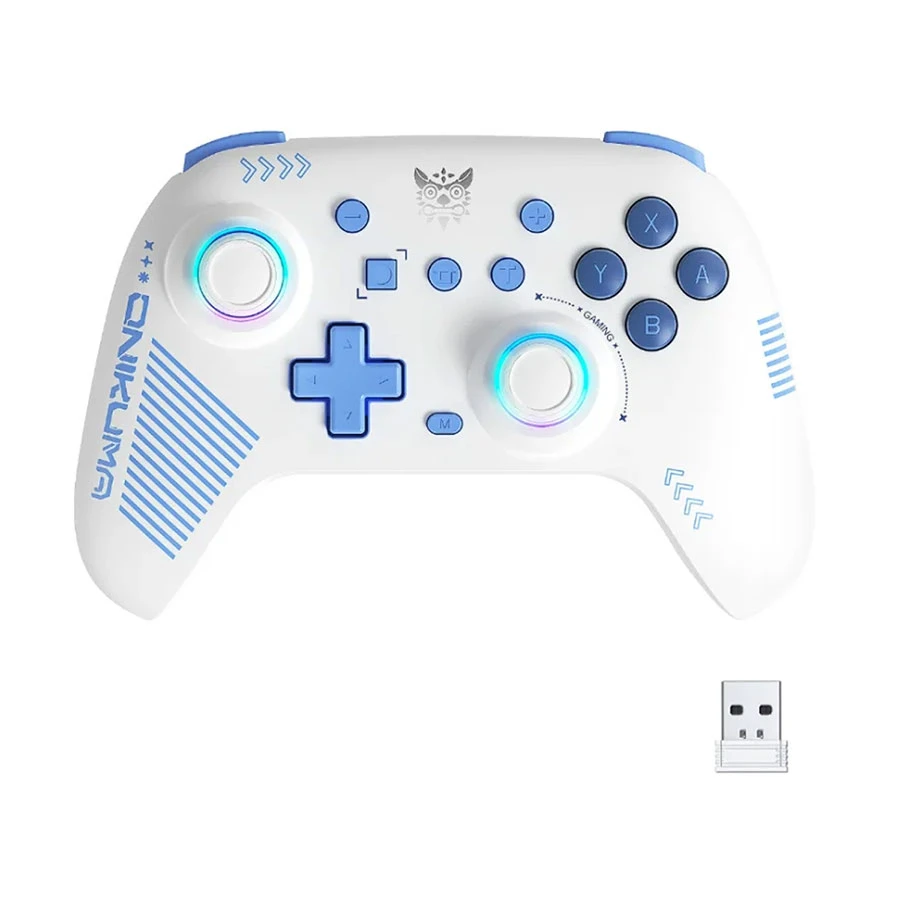
The ONIKUMA C1 is a versatile choice for PC and Nintendo Switch players. Its tri-mode connectivity supports wired, Bluetooth, and 2.4GHz use, while Hall Effect joysticks, mechanical buttons, dual vibration, and a six-axis gyroscope provide accurate and responsive control across different games. ONIKUMA product details
Best for: PC and Nintendo Switch gamers who want both wired and wireless connectivity in one controller.
A4TECH Bloody GPW70 for Wireless Gaming
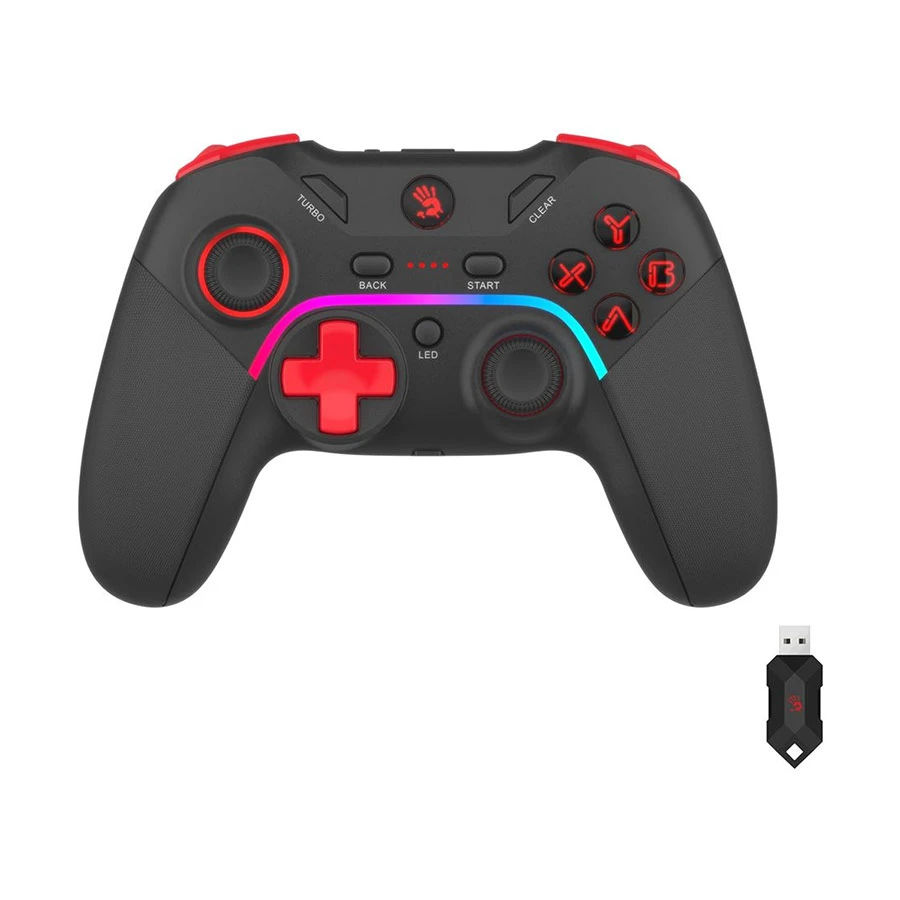
The A4TECH Bloody GPW70 suits players who want to use one controller with a PC or compatible Android device. It supports both 2.4GHz wireless and Bluetooth connections, making it more flexible than a basic wired gamepad.
Best for: Players who want wireless freedom and broader device support.
Before buying: Gyroscope support is not listed, so confirm this feature if you play games that use motion controls.
MSI FORCE GC20 V2 for Regular PC Gaming
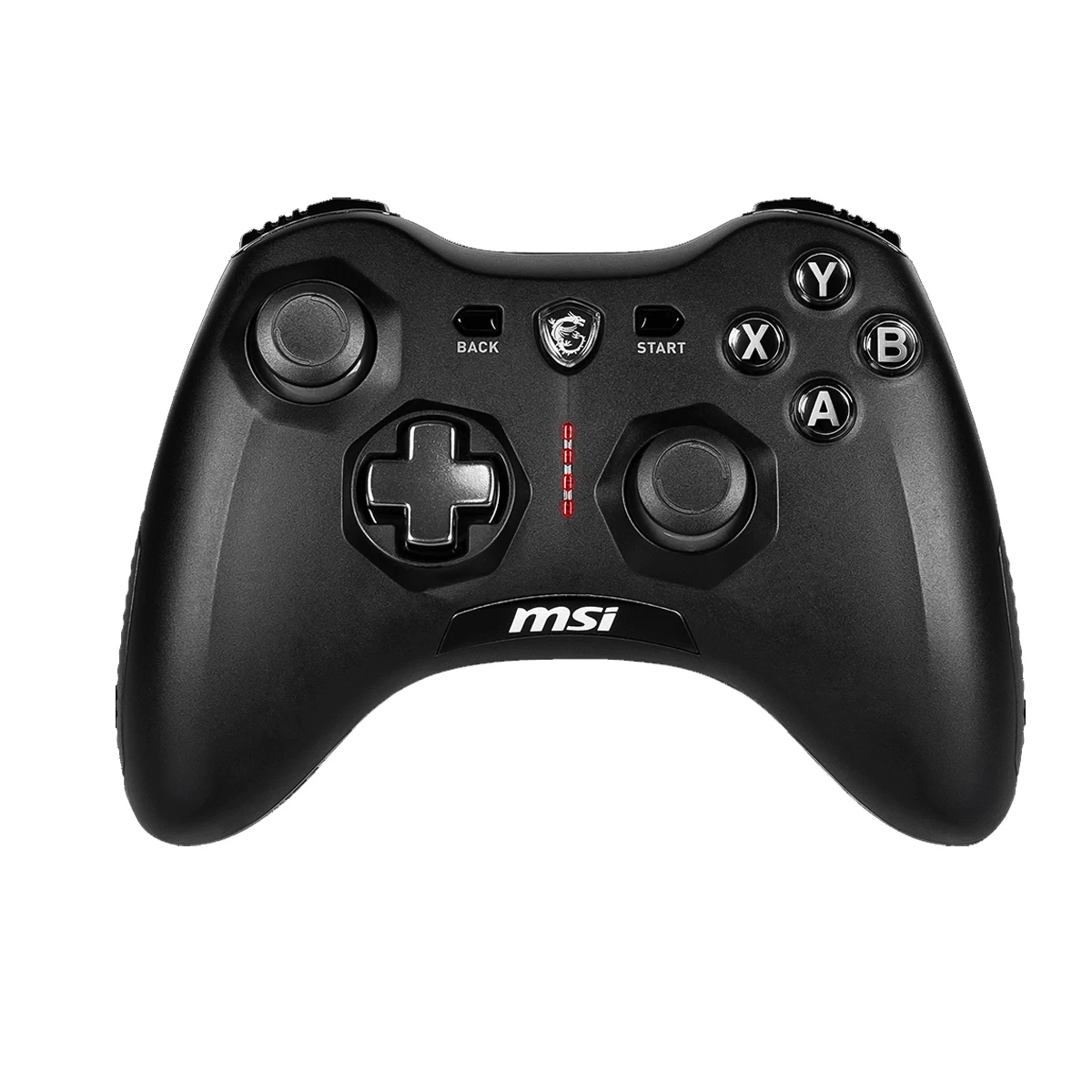
The MSI FORCE GC20 V2 is suitable for players who want a sturdier wired controller for regular gaming. It has an Xbox-style layout, analog triggers, dual vibration motors, and a replaceable magnetic D-pad cover.
Best for: PC players who regularly play racing, sports, action, or fighting games and prefer a wired setup.
SteelSeries Nimbus+ for Apple Devices
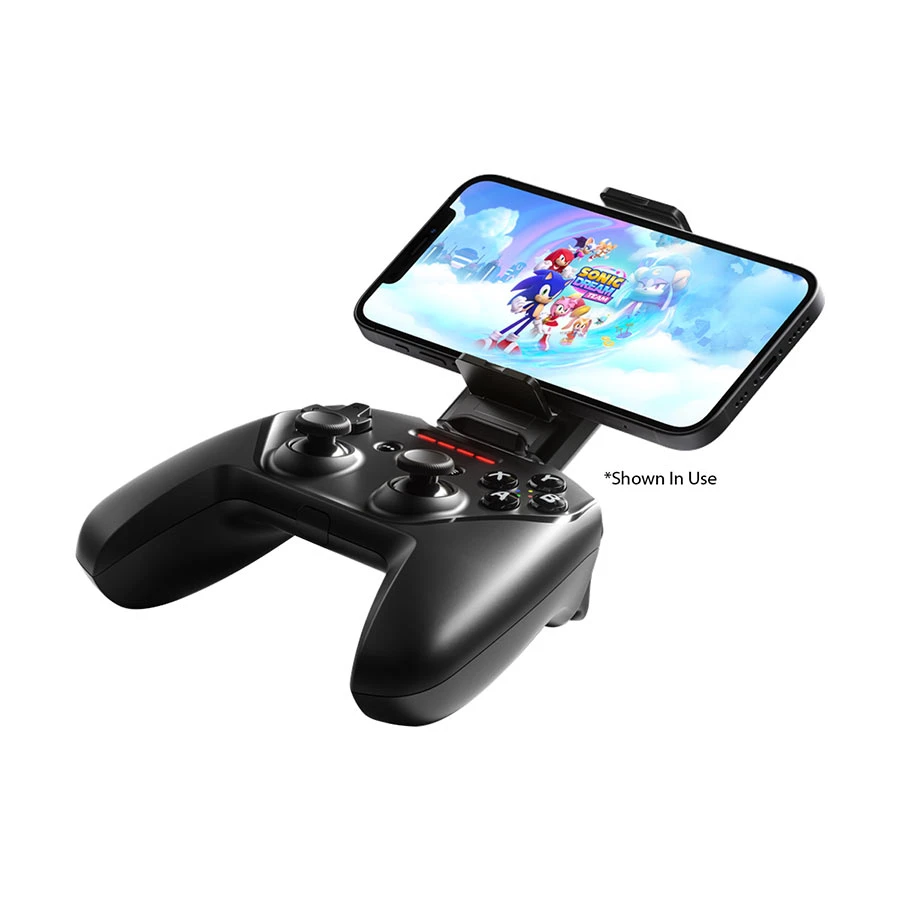
The SteelSeries Nimbus+ is designed for compatible Apple devices, including iPhone, iPad, Apple TV, and Mac. It includes Apple-licensed wireless connectivity, pressure-sensitive controls, a rechargeable battery, and a phone mount.
Best for: Apple users who play controller-supported mobile, Apple Arcade, or cloud games.
Before buying: It is not the practical choice for Windows, PlayStation, Xbox, or Android users.
Prices and availability may change. Check the latest product listing and compatibility information before purchasing.
Where to Buy a Gaming Controller in Bangladesh
You can buy gaming controllers from Ryans through the online store or nearby branches. Ryans offers gaming controllers from several brands with official warranty and after-sales support. Home delivery is available across Bangladesh, while EMI and Cash on Delivery may be available depending on the product, order value, and location.
Check the latest stock, price, warranty terms, and delivery options on the product page before placing your order.








Leave a comment